


 Back
Back






UPDATE: Click here to read our new review on the best golf apps for Apple Watch in 2021
Earlier this summer, while Rory McIlroy was storming the FedExCup points list and espousing his newfound commitment to living an intentional, digitally-efficient life, I was on a muni course trying to break 80 while fidgeting with my new Apple Watch.
My mission over the course of the summer was to review the immensely popular wearable as a golfer's primary GPS and scoring device. But in doing so it seemed impossible to write about the experience of using wearable tech during play without first remembering why disconnecting for a round is important to the health of humans in the first place.
Between April's Masters Tournament and the Tour Championship in August, McIlroy cited multiple times Digital Minimalism, a book by Cal Newport, that details how tech companies apply clever design to their mobile products and services to clutter your mind. The book, released in 2017, doesn't harp on wearable devices - or golf for that matter. But my mind couldn't help but connect the two throughout. A key point of the book is the idea of maximizing your "high-quality leisure." Put simply, your life should be organized so that in your down time, you aren't mindlessly scrolling apps or being distracted by group chats, but wholly partaking in richer forms such as crafts or socializing face-to-face.
Newport frequently cites the words and actions of such classic philosophers as Aristotle, Nietzsche and Henry David Thoreau. Thoreau was high on the idea of not just uninterrupted solitude but a heavy diet of walking.
I think that I cannot preserve my health and spirits, unless I spend four hours a day at least - and it is commonly more than that - sauntering through the woods and over the hills and fields, absolutely free from all worldly engagements.
Thoreau never wandered Walden Pond with a Mashie, but as a golfer it is so easy to identify that the game can serve a similar purpose if done a certain way: Walking, uninterrupted as much as possible by tech or phone calls or the outside world, is about as healthy of an activity as there is on this earth, marathons and CrossFit be damned.
Even Newport agrees that tech, applied wisely, can aid high-quality leisure. Social media connects, fitness-tracking encourages.
So is Apple Watch a tool that will enhance a round of golf or distract from it?
I'm leaning towards the latter.
Apple Watch as a golf wearable
My home course growing up had pine trees planted at 150 yards on every hole. Today, someone in seemingly every group has a GPS device or rangefinder (or both!). When used properly they speed up pace of play and will help you play better.
With Apple Watch I can play golf during the workday and receive all my Slack alerts, calendar reminders, texts, control a Bluetooth speaker and take phone calls. The multi-functionality is a gift to be celebrated. It can be a detriment, too. For every moment you're staring at a screen, you're not focused on your game, admiring the outdoors or socializing with your partners.
Using Apple Watch on the golf course, I found myself looking down and tapping more than I wanted to. I felt it distracted me more than it freed me up.
The big initial difference between Apple and my previous wearable, the Garmin Vivoactive HR, is that Garmin owns the device and the app. Apple Watch golf apps are all third party. This creates a variety of added decisions and some clunkiness in the user experience. Which should I commit to? Should I buy premium? I have to create another account? Can I transfer my stats?
All apps are tethered to your iPhone with Bluetooth and you have to start the round in your phone app of choice. I'll get into my thoughts on the best Apple Watch golf apps in a moment, but first, here are many general thoughts on the device itself:
What I like about the Apple Watch
- It is by far the most robust smartwatch I've used with capabilities ranging from Siri to myriad tracking and lifestyle apps to the ability to add cellular ($100 upgrade) so you can go places without your phone (you still need the phone for your apps though). I especially like the vibrating alerts and directions it gives me when I'm driving.
- The retina display is brilliant. The design, which has a touch screen, simple crown dial and button on the right side that toggles between open apps, is fairly easy to get the hang of. No matter which golf app you use, the on-screen display can really show you quite a bit of information.
- The Series 4 has more color and band options so you can personalize it. Most golf and activity watch designs are utilitarian bordering on ugly. Apple Watch is definitely ahead of the pack. I'd recommend going with a 44mm over the 40mm face, especially if you have fat fingers.
Apple Watch device: What I don't like
- The battery life is such (only about 36 hours or so) that you're constantly in a state of thinking you need to charge it, as if your mobile phone's daily energy management wasn't enough. With my Vivoactive HR I could get four days or so out of it without a charge if I wasn't using the GPS - and when you did charge, it could do so within about 30 minutes. Apple Watch takes a few hours to fully charge. (Why not simply charge it overnight? Well, I prefer the vibrating alarm since I wake up before my wife. If you dock the watch it will make noise.)
- The screen is totally dark until it detects you turn your wrist enough towards you to light up. This doesn't work well if you are trying to be subtle around company, or are holding a baby, etc. It effectively fails in these cases in its primary duty as a timepiece. The recent revealing of the Apple Watch Series 5 appears to address this with an "always-on" retina display.
- How long should we expect these $300-500 devices to last? My Vivoactive died after two years of heavy use. I purchased an Apple Watch 3 off Amazon and within a week the face had detached while at the pool. Because I didn't buy Apple Care, I was told I was out of luck. But Amazon stepped in and offered to replace it for free. (Editor's note: For the purpose of this article, Apple provided a demo Series 4 model, whose app responsiveness was generally faster than initial rounds with the Series 3.)
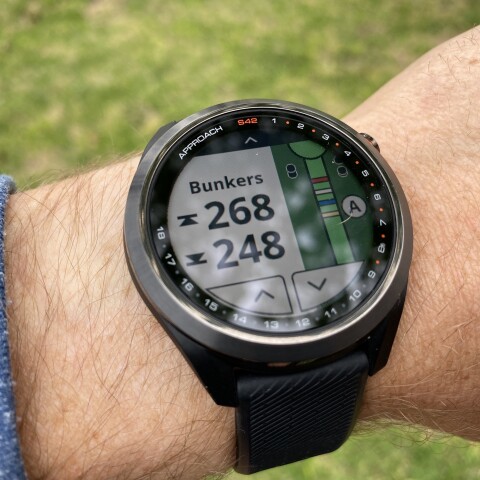
Best golf app for Apple Watch
Once you've spent the money on an Apple Watch, you now need to commit to a wearable golf app.
I downloaded the following: SwingU, The Grint, 18Birdies, Hole19, GolfLogix and Golfshot. In order to set up a round, you must start the round using the phone app and then add and launch the app in the watch. Regardless of what free app you use, you will be constantly reminded that technological Valhalla is just one premium purchase away. 18Birdies sends you up to three pop-up alerts before it lets you start the round. SwingU teases various features during the round but when you click on them, it prompts an upgrade. Who doesn't love shopping between shots?
In typical Silicon Valley fashion, all of the premium apps are subscription-based and can't be bought outright. Here is some pricing and my user experience with each:
SwingU: $24.99-$49.99/yr - The free app is simple but effective with large yardages and buttons for scoring. It had a feature of Garmin I sorely missed in the other Apple apps: when you arrived at the green, the watch display would automatically switch to scoring.
18Birdies: $99/yr. - The premium app is double the price per year of any of the others sampled and promotes a library of instruction, advanced game analytics and lots of social perks. As you'll see in the video above, its app's clickable areas are small and I had a hard time tapping in them.
The Grint: $19.99/yr. - It's a well-known free alternative to an official USGA handicap through your state golf association (but changes are coming with the World Handicap System). I found myself using this app the most thanks to having what seemed to be the most robust free experience with some additional advanced scoring and a nice display.
GolfLogix: $49.99/yr (No free watch app): The GolfLogix phone app has been a favorite for years and has tee times and instruction capabilities. The watch app has green images and layup distances. I didn't find it any better than the free Grint or SwingU watch apps. The phone app promotes advanced green reading tools. GolfLogix probably only makes sense if you're willing to use your phone in concert with your watch.
Golfshot: $39.99/yr - Watch display uniquely shows colorful hole flyovers but there was no scoring screen on the watch or front-back yardages in the free version.
Hole19: $49.99/yr - I initially had a tough time loading this app onto my watch for some reason but once uploaded it worked pretty well. The watch display is simple but clear with front-middle-back yardages. The watch scoring mode can be simple or advanced or turned off, and the analytics email post-round is cool. Nice design.


My pick for best free Apple Watch golf app: At this point I'm going with The Grint (download it on the App Store). The app seems to get kicked off the watch face the least and the UX in-round is strong. It captures a few extra data points like missing left or right and hazards without requiring a premium subscription. SwingU is a close second. If I choose to buy a premium version it will likely be SwingU.
A few general observations no matter which app you choose
Apple Watch is wired to all the other apps in your phone with watch capability as well as phone calls and texts. So when you're playing a round, all that stuff is available unless you have the time and foresight to toggle it all off. Being connected to work is great when you're sneaking in a few holes on your lunch break but less so when you've got a clear schedule and various push notifications, robo-calls and texts bombard you. I also didn't like being disrupted by the watch to be told I'd hit a fitness goal for the day, causing me to have to toggle back to the golf app.
The various premium apps all tout added game tracking and even personalized coaching. Do you know what I would love in a "premium" experience? Improved battery life, a display that isn't kicked off the screen regularly, and a one-click option that mutes all other apps.
The GPS in each app seemed reasonably accurate but there was always one or two shots each round where it was a little off. There is another complication when using GPS: is the reading from your phone or wrist? What if your phone is in your golf bag 15 yards away? Hole19 support has an article on that: The yardage on your wrist is coming from your phone's location, unless you remember to turn off Bluetooth once you begin the round.
Apple Watch for golf: final thoughts
Top golfers like McIlroy don't play golf to escape anymore, at least when there is millions on the line. But they perform best when they are laser focused in both practice and competition. It's a mindset those of us who want to play our best golf should consider when adding tech to our daily games. Apple Watch's golf apps are serviceable for GPS, scoring and game tracking. But as a golf-first device there is too much interruption, too much looking down, tapping and swiping, to believe it will improve your experience. It would go a long way if the developers could figure out how to keep the golf app on the screen for the duration of the round instead of constantly bouncing back to your watch's default home screen.
For those golfers who prefer a totally connected experience on the course, more so than a laser-focused golf setup, Apple Watch will help you keep score, see yardage, use Siri to reply to texts and manage your Bluetooth speaker. If you have the modern-day luxury of uninterrupted, high-quality leisure time, the Apple Watch isn't for you.
Personally, I'm leaning towards the rangefinder. It provides the most accurate yardage and the battery life lasts a long time. Paired with some advanced and more intuitive game tracking tools like Arccos might make sense. Or maybe the true minimalist way to play golf is simply looking for the pine trees at 150 yards and a paper scorecard.
I plan on diving into this whole rapidly changing and growing world of club and shot tracking and analytics next, and explore other various wearable distance and GPS devices. But first, if you'll allow, I'd like reconnect with a few rounds back in the analog state.
You can ask me some questions in the comments or on Twitter @brandontucker and I'll do my best to respond. Do you have an Apple Watch and use it for golf? I'd love to hear your feedback.

Stay in the Swing with GolfPass!
Get exclusive tips from the pros, in-depth course reviews, the latest gear updates, and more delivered straight to your inbox.






Comments (31)
Man, that was a helpful article. Really fulsome.
Agreed, keep it simple, play the course, watch for the markers, estimate the distances from time to time. I recently purchased a Shot Scope V3 watch, major distraction, I spent the entire round worrying if the watch was going to capture all the data. Did I hit the ball left, right, fairways in regulation, number of putts. how long did I hit each club. Not sure what I was going to do with all the information. Clutter, that's all it is. I put the watch away and did not use it my last two rounds. My game did not improve much, but I certainly enjoyed it more.
Thanks for the forum
Man, that was a helpful article. Really fulsome.
Agreed, keep it simple, play the course, watch for the markers, estimate the distances from time to time. I recently purchased a Shot Scope V3 watch, major distraction, I spent the entire round worrying if the watch was going to capture all the data. Did I hit the ball left, right, fairways in regulation, number of putts. how long did I hit each club. Not sure what I was going to do with all the information. Clutter, that's all it is. I put the watch away and did not use it my last two rounds. My game did not improve much, but I certainly enjoyed it more.
Thanks for the forum
I believe golf for the amatuar has become WAY TOO TECHNICAL and that natural feel and instinct have been lost in the wake of this obsessive adherence to technical statistics. I have been playing for about 3 years and generally shot in the low 80's to high 70's by just trusting my judgement and feeling my way around the courses, I am 56 years old and have had two back surgeries from car accidents but just back to the range when recovered and just tried to work on getting my feel and rhythm back. Technology will not teach you how to scramble or putt. Work on those 2 factors and you won't need a bloody watch to tell you how to play. Robots don't win golf tournaments nor put you with in 3 feet on a 60 foot putt. Please remember that the next time you are in the trees on the pine straw and have to hook your rescue club around a clump of trees to get on the green. I suggest using your imagination instead.
Thank you
Very good, helpful and insightful article. I'm considering an Apple Watch but the fact you can't disable all other apps when using it on a golfing app, is a real negative.
Anyone any suggestions?
Just read your review of Apple Watch as golf gps wearable. I’ve been using Golf Shot GPS on my phone but also have an Apple Watch Version 1 and wanted to use it as well. My problem is I can’t read it in the sun or with sunglasses on—screen is dark and text isn’t bright enough. Any suggestions or Fixes in later watches? Thanks!
This was an excellent read. I appreciate how you incorporated digital minimalism into the discussion. Especially in a sport like golf, technology may need to take a backseat for those of us looking to relax and reflect during our round.
GolfPad is a great app. I would like to see how you would compare to the ones in your review.
I have been using Golf Pad for some years with their Link for registering clubs and each GPS point of stroke. Works very well for knowing the distance of each club amongst all the other usual benefits and statistics. The major benefit leading to a 20% improvement in handicap was to find I am usually better taking one club more than I thought I needed. Previously thinking/hoping I hit further than my real average distances. Two rounds into using an Apple watch series 5 with Golf Pad. Works I find it works well but I still want confirmation on GPS accuracy. So far it seems to be 5m out on 100m shots which is verging on one club difference. I am doubling up with a laser to continue testing.
Thanks for the review. I was thinking of replacing my Garmin S20 Approach because the crystal broke (dropped a 4x4x8 on it while building a deck) but I want a GPS that is dedicated to golf while playing golf. I'll be getting another Garmin.
I've used SwingU for a number of years, and I find it invaluable. My game has improved so much, just by knowing distances to greens, water, bunkers, etc. I would never voluntarily go back to trying to guess the distance, especially on a course I don't know. Having said that, I don't use my Apple Watch, but rather my phone. I gave it a go with the watch, and there was too much happening on that tiny screen for me to use it effectively. Add in the occasional beep in the middle of a backswing, and I knew it was not for me. I have no issue handling my phone as I walk the course, and it goes in and out of the bag without much thought. The user interface for the phone is well done, and the course maps are great. I like my Apple Watch very much, but not for golf.